
Searching for Consensus & Data
Your group has now likely begun to meet regularly and some of the technical work has likely also begun. You may now benefit from discussing tools for enabling full participation, as well as some models for thinking about how we communicate in groups and how some patterns of “stuck” communication can be resolved. Finally, we’ll end on a primer for finding data useful for your project, either from existing data repositories or via sensibly-composed, general searches.
Moving from Debate to Dialogue
Dialogue is a collaborative effort to understand and learn from each other. Debate, on the other hand, is an oppositional effort to convince the other side that you are right. Inclusive facilitation aims to support dialogue and skillful discussion. Dialogue allows groups to recognize the limits on their own and others’ individual perspectives and to strive for more coherent thought. Dialogue becomes a container for collective thinking and exploration–a process that can take teams in directions not imagined or planned.
In dialogue, all views are treated as equally valid, and different views are presented as a means toward discovering a new view. Participants listen to understand one another, not to win. Complex issues are explored and shared meaning is created. When it comes time to make a decision, skillful discussion is required. Both skillful discussion and dialogue are critical to the collaborative process, and the more artfully a group can move between these two forms of discourse (and out of less productive debate and polite discussion) according to what is needed, the more effective the group will be.
- Intent to win
- Listening to be understood
- Power struggles
- Competition “turf war”
- Loudest wins
- Ideas judged by who says them
- Intent to protect self, others
- Surface friendly
- Ideas judged by friendships/relationships
- Impulsive, based on feeling, low data
- Influence occurs outside the meeting
- Limited active or empathetic listening
- Intent is closure; informed decisions
- Balance influence and inquiry
- Focus on issues not personalities
- Reasoning is made explicit
- Ask about assumptions without criticizing
- Influence is based in logic and data
- Intent to build mutual understanding
- Listening to understand thoughts and feelings
- Able to suspend assumptions
- Energy used to find the right questions
- “Container” for collective thinking
- Influence is found in shared meaning created by groups
David Kantor’s Four Player Model is a helpful tool for diagnosing “stuck” patterns of communication, (including entrenched debate and polite discussion), and interceding to help shift to a more productive pattern.
Based on over 30 years of observation and study of face-to-face communication in many groups, Kantor developed the Four Player Model and a broader theory of Structural Dynamics. The model identifies four actions of effective communication:
- Move - Initiate an idea, action, or direction for conversation
- Follow - Continue the direction or flow of the conversation; support a move, either by agreeing or asking for more information
- Oppose - Challenge or disagree with the idea, action, or suggested direction
- Bystand - Notice and articulate what’s happening in the conversation, add a neutral perspective
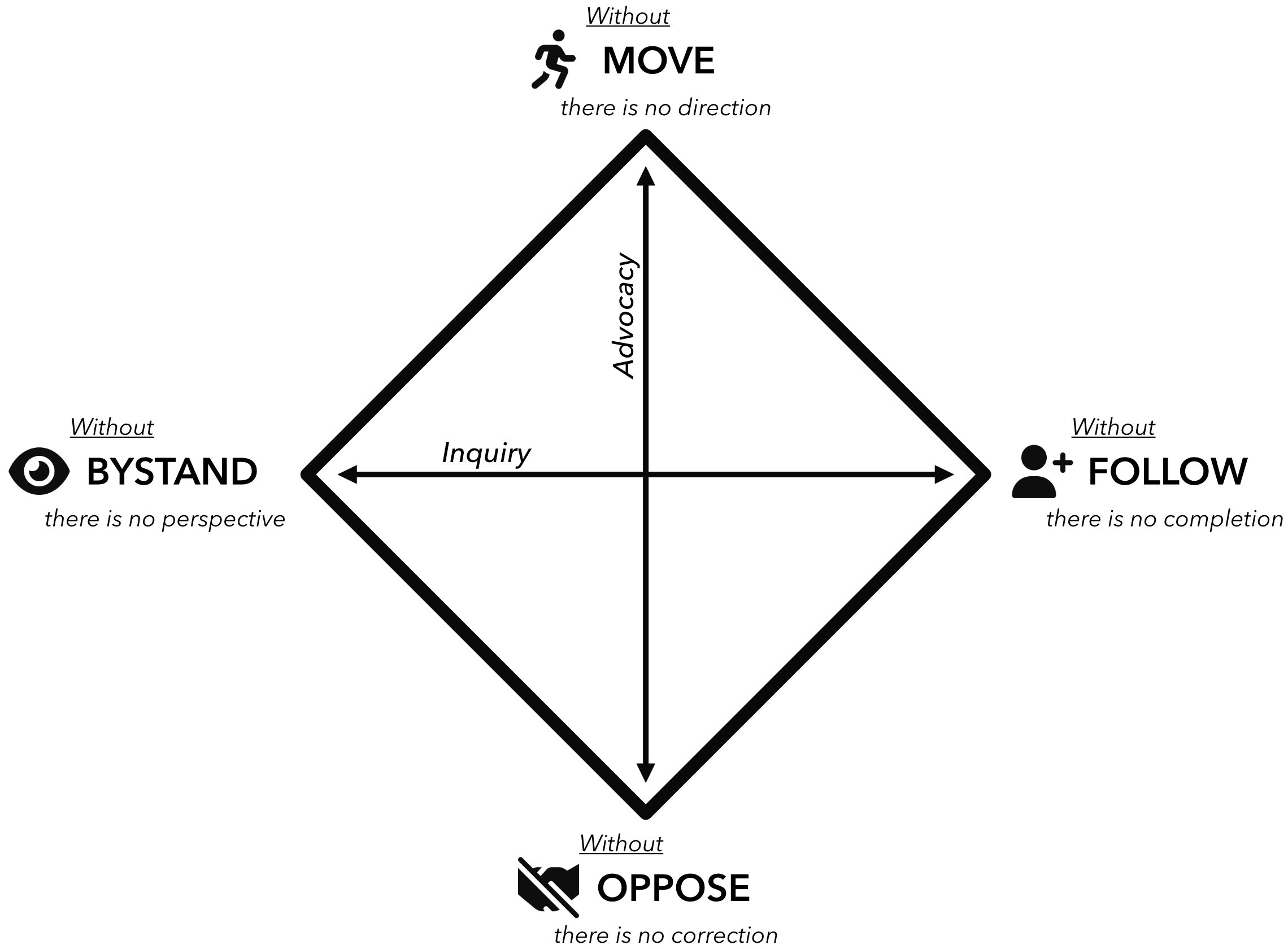
Each action in a group conversation can be coded into one of these four action modes. Most of us have one of these modes that we feel most comfortable in and tend to default to in a group. The most effective conversations involve good listening and the skillful use of all four modes. Common “stuck” patterns emerge when groups are not deploying all four actions.
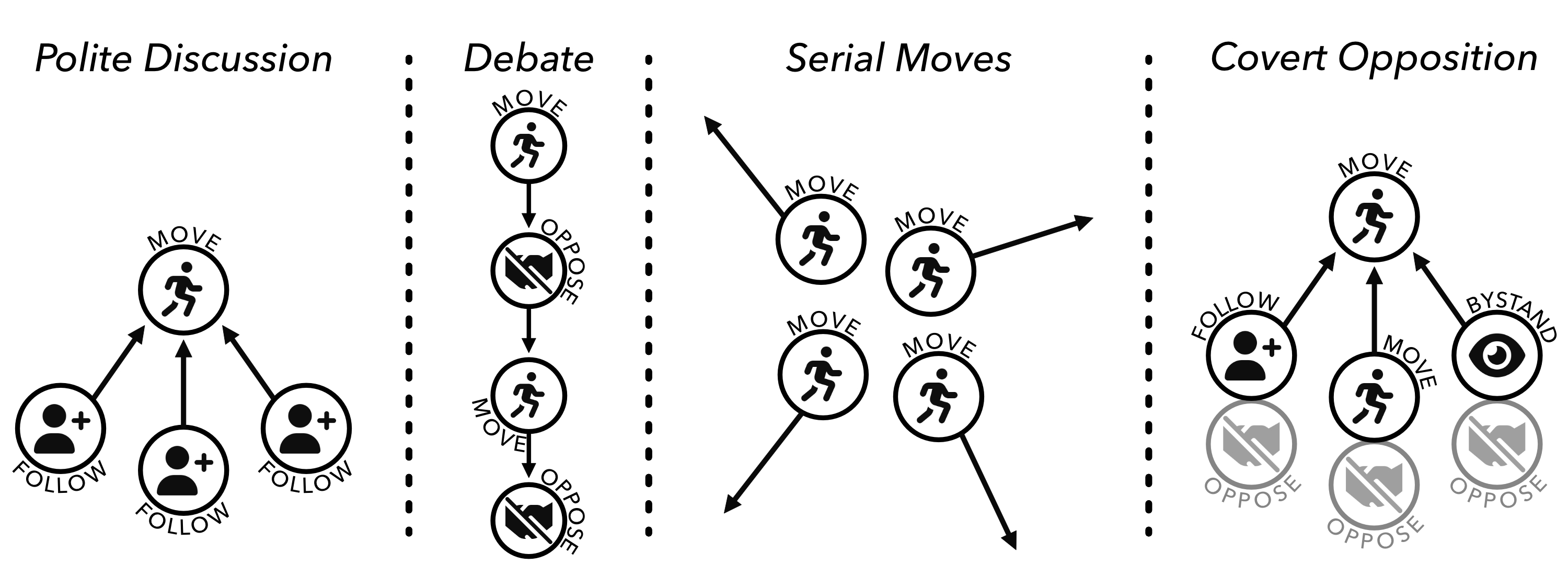
Lots of idea generation; may feel like a barrage; no clear thread, decision, or follow through
Any of the other modes can help here, since move is the only mode being engaged.
Add a follow to give momentum to a particular move and steer the conversation in that direction, e.g., “Can we go back to the idea that Jose put on the table? That felt like a topic that could really use our attention. Shall we focus there?”
Offer an effective oppose - “We’ve heard a lot of different ideas. I’d like to focus on the one Amelia laid out. I’m interested in the research question, but I don’t think machine learning is going to be the most productive approach. Can we dig in to this one?”
Use a bystand to bring awareness to and disrupt the dynamic - “Hey gang, we’re 20 minutes into our call and we’ve put a lot of different topics on the table. Where do we want to focus ourselves so we can walk away with some clear next steps?”
Moves are followed with little discussion or resistance; also known as Courteous Compliance
Prompt an effective oppose:
- Who sees it differently?
- What’s at risk here?
- What other angles should we consider?
Invite a bystand:
- Where is the group right now?
- What are you noticing?
- Is there an elephant in the room that needs to be named?
Individuals are locked in a back and forth where each move is met with resistance / opposition
Invite a follow:
- What do you like about the proposal on the table?
- What do you agree with that we could build upon?
Coach for a more effective oppose by inviting those who have been opposing to identify some aspect of the idea they do agree with (even if only 2%), in addition to the specific aspects they object to.
Invite a bystand:
- In addition to the two viewpoints on the table, I’d love to hear from some other perspectives.
- What are you noticing?
- What might we be missing?
On the surface, moves are followed, and the conversation appears harmonious, but below the surface, people have unspoken reservations. Opposition tends to be expressed outside the bounds of the conversation or harbored as resentment.
Uneven power dynamics are often behind this pattern - group members defer to the moves of those with more power or seniority.
Invite those with more power to experiment with following or bystanding to open up space for other players to make a move.
Prompt a transparent oppose:
- Who sees it differently?
- What’s at risk here?
- Are there some cons to the proposed idea?
If others aren’t comfortable, you can offer an oppose, e.g., by suggesting the limits of the proposed move be tested across different scenarios.
Offer a bystand, e.g., “I want to offer a reflection from another team I was part of. On that team, we kept having meetings where it seemed like everyone was in agreement, but then we would leave, and over and over again there would be little follow through and more than a little grousing. People’s real opinions were only coming out in side conversations outside of the meeting. We lost a lot of time and forward momentum because people didn’t feel like they could air their concerns in the larger group. Do you see that happening here? Does anyone have a suggestion for how to make this a safer space to critically discuss ideas?”
Designing Meetings for All Thinking Styles
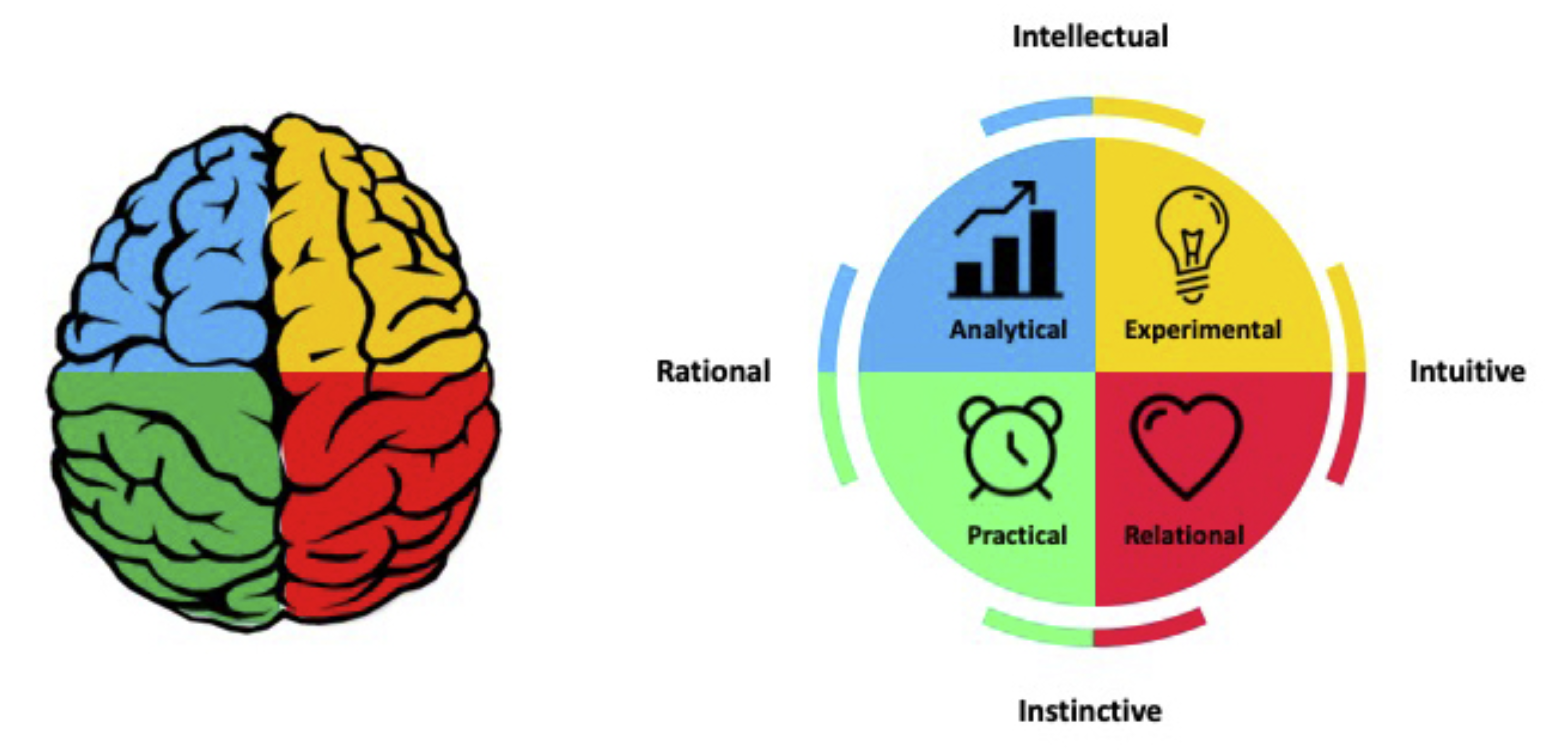
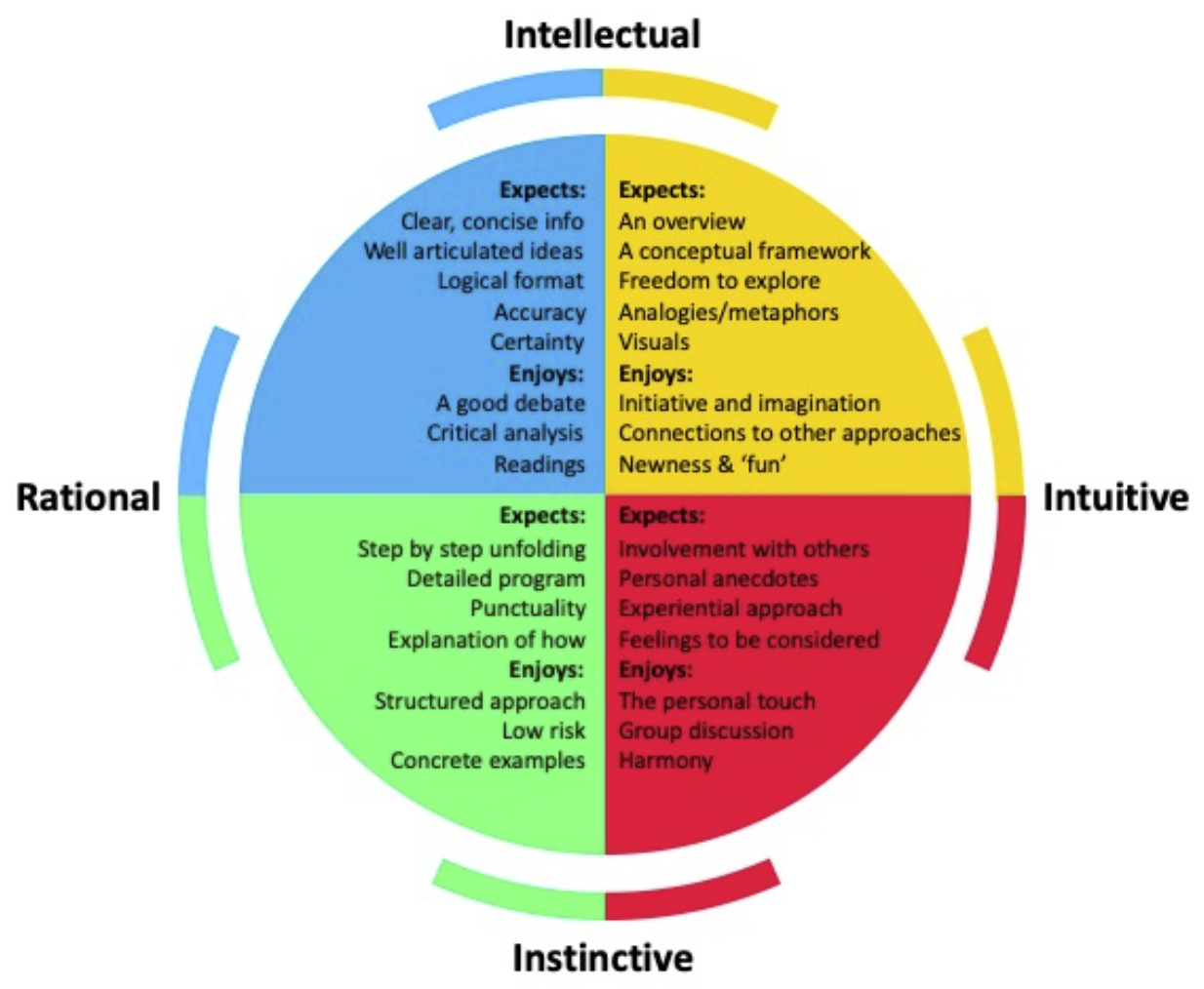
People have different thinking preferences which influence what they expect and enjoy in group processes. There are many different frameworks for categorizing these facets but we’ll use one based off of Ned Herrmann’s Whole Brain Model.
Choosing Search Terms
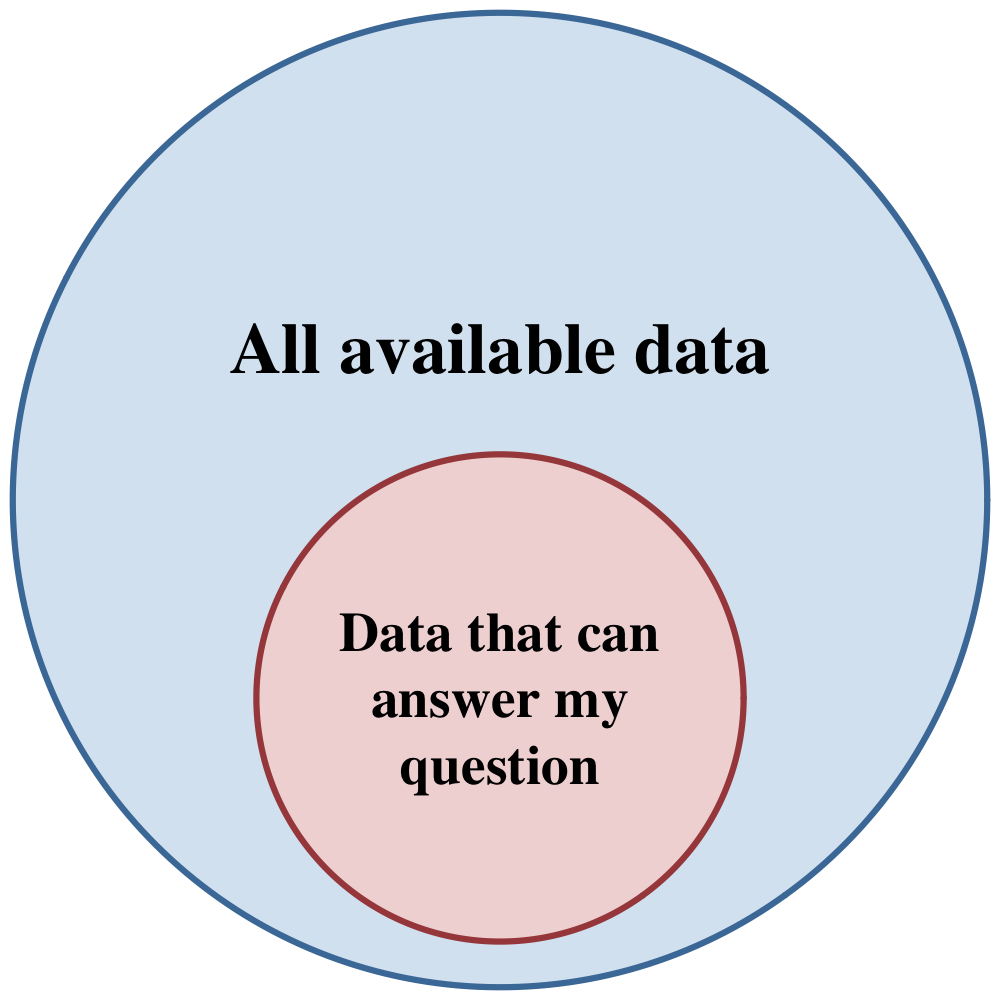
The answer to any research question is found in data. Many research questions are formulated with specific data in mind, but synthesis questions are often formulated with limited data in-hand and an intention to scale up the question to “all the available data.” Therefore, synthesis projects usually begin with a process of data discovery — finding datasets that can be used to answer the question.
Data discovery isn’t always easy, but starting with a clear research question helps because you can map it to the search criteria and terms that you’ll use. This is because research questions and datasets both have the same conceptual elements, which include:
- Observational units: a thing or phenomenon to be observed or measured. Examples: an ecosystem process, a layer of soil, animals, part of a tree
- Variables: an attribute or characteristic of the observational units that can take different values, and which can be observed, measured, or estimated. Examples: precipitation, gas flux, species abundance
When mapping these concepts to data, think of the observational units as being represented by rows in a data table, and variables as being represented by the columns. There are some other elements that usually appear in both a research question and the data.
- Groups, which are observed or hypothesized subdivisions in the observational units and data. Examples: treatments, taxonomic group, functional types
- Temporal dimensions, which are necessary to understand when things happen or the effect of time. Examples: time of observation, age of subject
- Spatial dimensions, which describe where things happen or the effect of location. Examples: location of observation or study subject, distance to resource
Translating these concepts, as they are appear in your research question, to the attributes of the data you will search will help you find useful datasets more efficiently. Below are some examples of mappings between research questions and data search terms.
| Research question | Conceptual mapping | Data search criteria |
|---|---|---|
| Does species richness increase or decrease after disturbance? | Does variable X increase or decrease with time? |
|
| Research question | Conceptual mapping | Data search criteria |
|---|---|---|
| Are forests or deserts more sensitive to vapor pressure deficit? | Is group 1 or group 2 more strongly related to variable X? |
|
| Research question | Conceptual mapping | Data search criteria |
|---|---|---|
| Is the latitudinal gradient in small mammal body size changing? | Is the relationship between variable X and variable Y changing? |
|
Once you have an idea of your search terms, it is time to think about where to search for data.
Data Repositories
When you start a synthesis research project, you may already have some datasets in-hand at the outset but it is likely that you will need to find more data to test your hypotheses. Research data repositories are organizations or facilities that are primarily dedicated to storing and managing research data, so they are a great place to find and access relevant data for answering your research question. There are a lot of data repositories out there. In fact, the Registry of Research Data Repositories (re3data.org) lists 3526 repositories at the time of writing, so you probably can’t search them all exhaustively. It helps to know the landscape and search efficiently.
At most repositories you can search and access data through a graphical interface on the website, or by writing calls to an underlying “application programming interface”, or API. You may need to read the repository’s documentation to understand and use the API directly, but often repositories provide “wrappers” for the API written in your favorite programming language that make it easier. Something you’ll notice as you interact with repositories in 2026 is that many require you to create an account and login to access data. Although it may seem antithethetical to open science policies, authentication requirements are becoming the norm as repositories protect their systems and data from malicious actors and “bot” traffic (often AI-driven) on the internet. For now, be prepared to make an account to access data, and later in the course we will provide some guidance on low-friction ways to securely1 authenticate with your repository credentials when you use scripts and API calls.
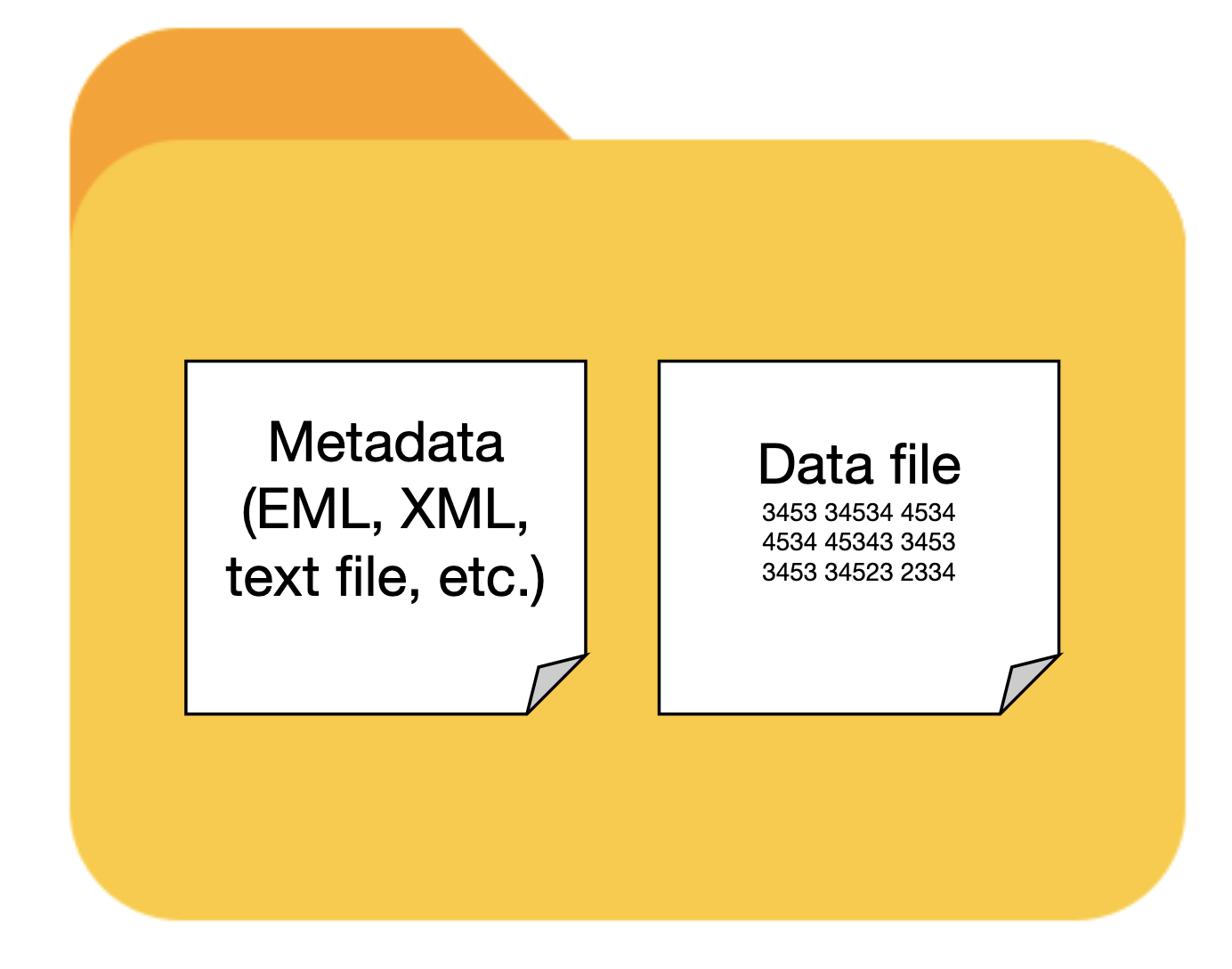
We’re about describe a bunch of repositories, and then move on to strategies for searching them. It is first worth mentioning that, while we visit repositories to access the many, many data files they contain, every repository (so far as we know) also publishes metadata describing those data. If you’ve never heard of metadata before, the quick definition is “data about the data,” or information describing a unit of data. Metadata usually contains information about:
- who collected the data
- what was collected
- when, where, how and why the data were collected.
When you search in a repository or aggregator, you are not searching the data themselves, you are searching the metadata. The metadata contain essential information that you need to understand the data, evaluate if they are fit for your research purpose, and use in your analysis. So, research data should always be accompanied by descriptive metadata, a combination we refer to as a dataset. Keep the dataset concept, and the value of metadata, in mind as you search for data, and as you create your own synthesis data products.
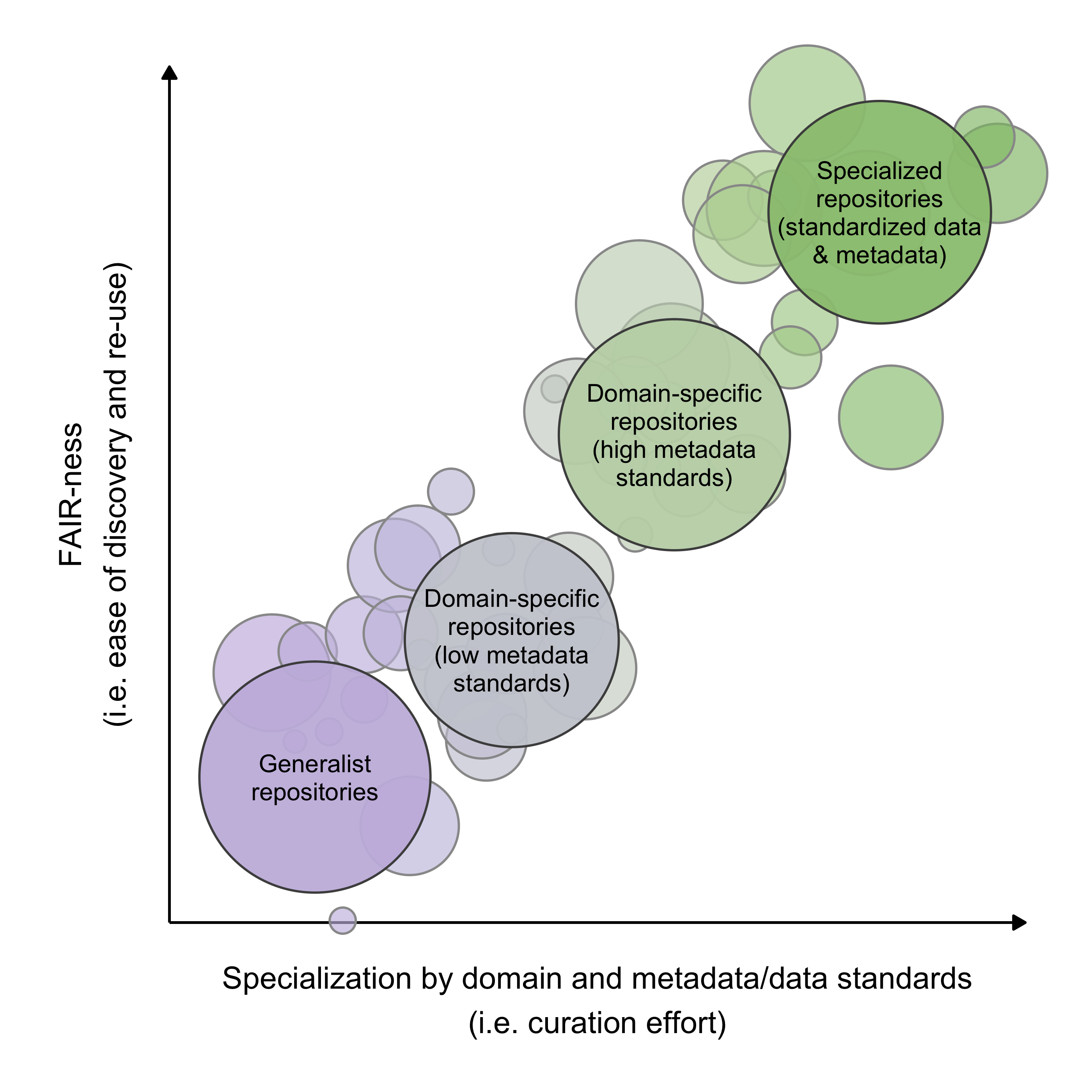
We can categorize repositories a few different ways, though keep in mind that these categories are more of a spectrum. Generalist repositories hold all kinds of data from all sorts of research. They tend to have fairly lax requirements for metadata and data quality, so you may have to sift through your search results carefully to determine if a dataset is fit for use. Domain-specific repositories specialize in data from a particular domain, such as a scientific discipline (e.g. environmental science or biomedical research), region (e.g. Arctic data), or research community (e.g. USGS). They tend to have higher metadata standards for the data they accept into the repository. Data specialist repositories specialize in publishing a limited number of data types. They may only accept data from specific sources or research networks (e.g. NEON) and usually have strict requirements for metadata and data formatting. These differences in repository specialization can have big impacts on how much time you spend finding useful data and getting it ready to analyze.
Below we present three non-exhaustive lists of ecology and environmental data repositories that have proven useful to other synthesis projects in the past. They are broken into categories as above, and listed in alphabetical order. The “ Package” column links to packages that can be used to find and access data from the repository in an R script (these are API wrappers, essentially). If it contains the GitHub logo () then the package is available on GitHub but not on CRAN (or not available at time of writing). The “In DataONE” column indicates whether the repository’s holdings are indexed in DataONE, which is a search aggregator, as explained below.
| Name | Description | Package | In DataONE |
|---|---|---|---|
| Arctic Data Center | The primary NSF-funded repository for Arctic research data, accepting observational, experimental, and modeling data from multiple disciplines. Uses EML metadata and operates as a DataONE member node. | dataone |
|
| BCO-DMO | The Biological and Chemical Oceanography Data Management Office serves NSF-funded ocean science projects, curating biological, chemical, and physical oceanographic data from research cruises, moorings, and laboratory experiments. Marine and coastal LTER sites often publish data here. | – | |
| EDI | Contains a wide range of ecological and environmental datasets, including long-term observational data, experimental results, and field studies from diverse ecosystems. Specializes in detailed metadata (as EML) and is one of the primary repositories for LTER data. | EDIutils |
|
| ESS-DIVE | The Environmental System Science Data Infrastructure for a Virtual Ecosystem (ESS-DIVE) includes a variety of observational, experimental, modeling and other data products from a wide range of ecological and urban systems. Used by many Department of Energy funded science programs. | – | |
| NASA | Provides data on earth science, space exploration, and climate, including satellite imagery and observational data for both terrestrial and extraterrestrial studies. Nice GUI-based data download via AppEEARS. | nasadata |
– |
| ORNL DAAC | One of NASA’s Distributed Active Archive Centers (DAACs), based at Oak Ridge National Lab. Specializing in terrestrial ecology and biogeochemical dynamics and including field campaign, remote sensing, and model archive data with detailed user guides for each product. | – | – |
| PANGAEA | A curated repository based in Europe for a wide range of Earth and environmental science data. Frequently used to deposit data as supplements to journal articles. | pangaear |
|
| USGS | Hosts data on geology, hydrology, biology, and geography, including topographical maps and natural resource assessments. | dataRetrieval |
| Name | Description | Package | In DataONE |
|---|---|---|---|
| AmeriFlux | Provides data on carbon, water, and energy fluxes in ecosystems across the Americas, aiding in climate change and carbon cycle research. | amerifluxr |
– |
| FLUXNET | A global network aggregating and reprocessing eddy covariance data from regional networks including AmeriFlux and ICOS. Data pass through a uniform gap-filling and partitioning pipeline (e.g., the FLUXNET2015 release), producing directly comparable carbon, water, and energy flux products across sites. | – | – |
| GBIF | The Global Biodiversity Information Facility (GBIF) aggregates global species occurrence data and biodiversity records, supporting research in species distribution and conservation. | rgbif |
– |
| Google Earth Engine | Google Earth Engine is a cloud-based geospatial analysis platform that provides access to vast amounts of satellite imagery and environmental data for monitoring and understanding changes in the Earth’s surface. | rgee |
– |
| ICOS | The Integrated Carbon Observation System provides standardized greenhouse gas and flux measurements from European atmospheric, ecosystem, and ocean stations. Sampling protocols, instrumentation, and processing are harmonized across the network, and data are released under a common licence with DOIs. | – | – |
| Microsoft Planetary Computer | The Microsoft Planetary Computer is a cloud-based platform that combines global environmental datasets with advanced analytical tools to support sustainability and ecological research. | rstac |
– |
| Movebank | A free, online database of animal tracking data hosted by the Max Planck Institute of Animal Behavior. Billions of observations contributed by a worldwide community of researchers. | move2 |
– |
| NCBI | Hosts genomic and biological data, including DNA, RNA, and protein sequences, supporting genomics and molecular biology research. | rentrez |
– |
| NEON | Provides standardized ecological data from a network of intensively monitored U.S. field sites, covering biodiversity, ecosystems, and environmental changes, supporting large-scale ecological research. | neonUtilities |
|
| NOAA | Offers meteorological, oceanographic, and climate data, essential for understanding atmospheric conditions, marine environments, and long-term climate trends. | EpiNOAA-R |
|
| TERN | Data portal for Australia’s Terrestrial Ecosystem Research Network, providing ecological data from field sites across Earth’s smallest continient. Somewhat similar to NEON in the U.S. | ausplotsR | |
| OBIS | The Ocean Biodiversity Information System is a global clearing-house for marine biodiversity data, holding over 100 million occurrence records plus associated measurements and facts. Contributions are standardized to Darwin Core and validated before publication. | robis |
|
| OpenTopography | Provides high-resolution topographic data, including lidar point clouds, derived rasters, and global elevation products, with on-demand processing tools for generating DEMs and derivative products. | – |
| Name | Description | Package | In DataONE |
|---|---|---|---|
| Dryad | A curated, nonprofit repository for data underlying scientific publications, with a focus on biosciences. Accepts any file format, applies CC0 to all submissions, and assigns DOIs. Widely used to satisfy journal data-availability requirements. | rdryad* |
|
| Figshare | A general-purpose repository for figures, datasets, posters, preprints, and other research outputs. Minimal metadata requirements, DOIs on deposit, and a generous file-size allowance make it a quick option for supplementary materials. | deposits |
– |
| Harvard Dataverse | An open repository hosting datasets across all disciplines, organized into individual “dataverses” that let projects or institutions manage their own collections. Supports versioning, DOIs, and a structured citation metadata block. | dataverse |
|
| Zenodo | A general-purpose repository operated by CERN, accepting any file type or discipline. Integrates directly with GitHub to archive software releases and mint DOIs, with a concept DOI that always resolves to the latest version. | zen4R |
– |
Searching across repositories
If you don’t find everything you’re looking for in a particular data repository, you might want to consider a broader search across many repositories. There are a few data search aggregators out there that are quite useful for this. These services collect or index metadata from many repositories and allow you to search them in one interface. They do not always provide the data directly, instead linking out to the source repository. Be careful to screen out duplicate results if you search directly in repositories and then in aggregators where those repositories are listed.
| Name | Description | Package |
|---|---|---|
| DataONE | Aggregates environmental and ecological data from global sources, focusing on biodiversity, climate, and ecosystem research. | dataone |
| Google Dataset Search | Google Dataset Search crawls schema.org metadata published on repository landing pages to make datasets discoverable across thousands of sources at once. Useful as a starting point when the holding repository is unknown, but coverage depends on how well each repository exposes its metadata. | – |
| OpenAIRE EXPLORE | OpenAIRE is a central organization in the European Commission’s open science initiative. The EXLORE tool indexes dataset metadata from thousands of repositories, journals, registries and other sources. Data sources are worldwide, not just European. | OpenAIRE |
| Open Traits Network | The Open Traits Network has compiled an extensive lists of repositories for trait data. Check out their repository inventory for trait data. | – |
More resources
- The executive branch agencies of the U.S. federal government collect lots of data. They are distributed across many repositories, which makes it a little difficult to know where to look. The Federal Data Field Guide explains the federal data landscape, and the Data.gov catalog provides a fairly comprehensive listing of published federal datasets.
The Search, Evaluate, and Refine Loop
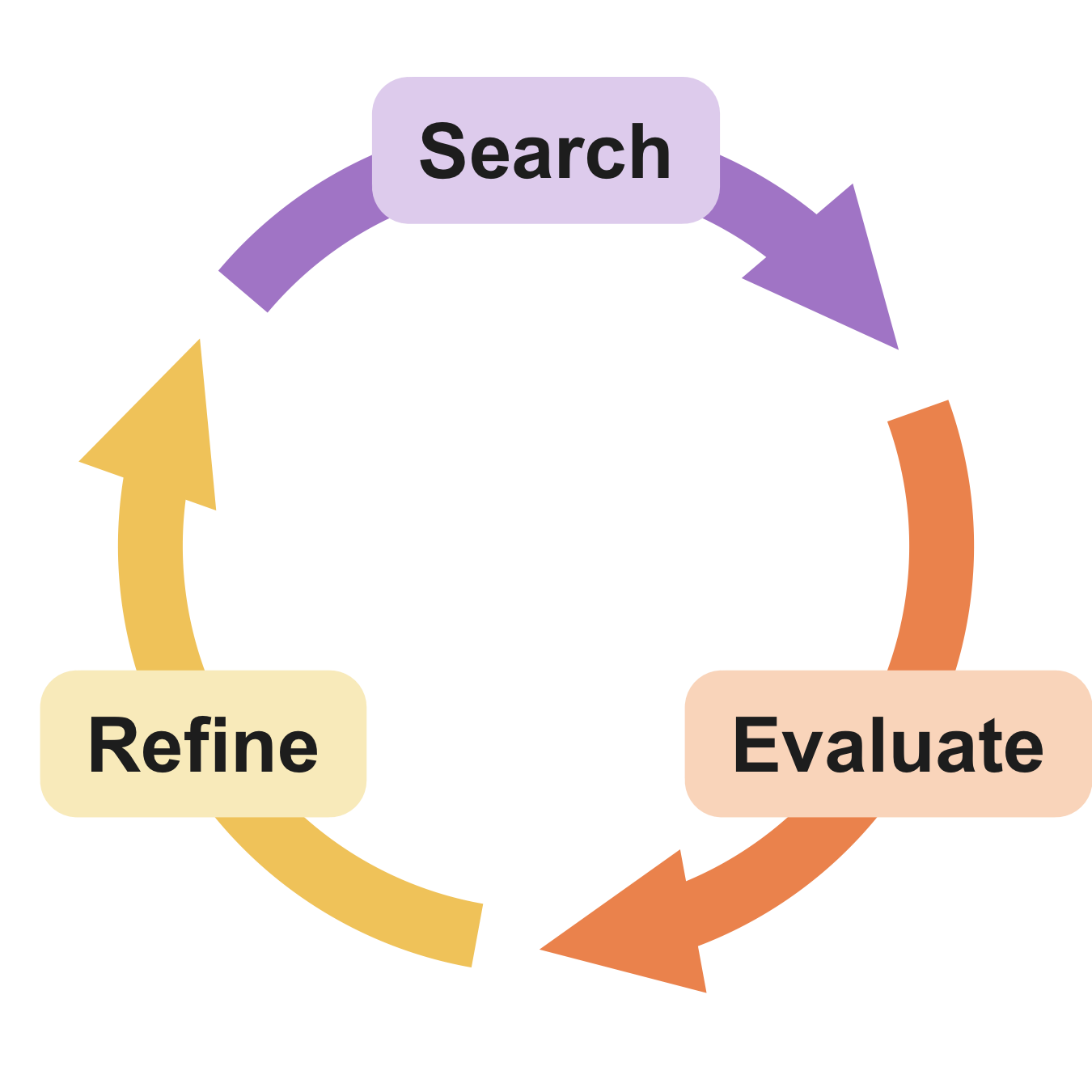
Searching for data effectively is an iterative process. You’ll usually start with simple exploratory searches, evaluate results, refine the search to include more specific terms or logic, and then search again. You may have to execute this loop multiple times to get the results you need for a synthesis project.
The evaluation step in this loop is key and typically involves answering some questions about the search results. These questions should range from simple sanity checks to in-depth evaluation of individual datasets, and the answers you get will tell you how to refine your search. Below are some examples of questions to ask during evaluation.
- Did the search find datasets you know are present? This is a basic sanity check that tells you if your search terms are effective. If you started a synthesis project with some candidate datasets, or you’ve browsed the target repository a little, just make sure you can find things you already know are there.
- After spot-checking a few search results, do they appear fit-for-use? “Fit-for-use” means a dataset can be used to answer your research question. To know this you must check whether the observational units, variables, groups, and temporal/spatial dimensions that you are interested in are present.
- Did you get too many results to evaluate? If you did, you may want to add or exclude search terms and try the search again, or find another way to winnow down the results.
- Did you get too few results? If your early searches return only a few results, or no results, you’ll probably need to expand your search terms or search in other repositories. If you consistently get few to no results when searching repositories try an even more targeted approach like reaching out directly to data managers and researchers.
Once you’ve done proper evaluation, you need to refine the search. How to do this depends on the answers to your evaluation questions above. In the tabs below we describe some practical strategies you can use to refine the next iteration of your search.
Dataset authors sometimes use heterogeneous terms for observational units, variables, groups and temporal/spatial dimensions when describing a dataset for publication. Repository curators do not always standardize these terms in the published metadata. So, if your search didn’t find what you were looking for you may have chosen overly-specific search terms. Remember that scientific language is full of synonyms, acronyms, and closely related terms, and adding these to a search may return more results. For example:
- “water” and “H2O” are the same thing
- “grasses” and “Poaceae” refer to the same taxonomic group
- “net primary production” is commonly called “NPP”
- “Nitrogen addition” is a kind of “fertilization”
- “soil CO2 efflux” is mostly equivalent to “soil respiration”
- “relative abundance” is one measure of “community composition”
- “Simpson’s diversity index” is derived from “species abundance” data
- “vapor pressure deficit” is derived from “air temperature” and “humidity”
You can also include broader, more inclusive terms in your search to capture a wider range of concepts, taxa, times or locations in the data. Here are a few suggestions how:
- Search broader taxonomic groups (genus or family) or functional groups (herbivores, benthic macroinvertebrates), instead of only species binomials.
- Searching for higher-level processes or phenomena can lead to specific variables of interest. For example a “forest carbon cycle” search might produce “litterfall” results, and a “eutrophication” search might produce “dissolved oxygen” results.
- Search on region, state, or country names in addition to more localized site names. For instance, searching for “North Atlantic Ocean” might produce useful results if “NES LTER” does not.
Constructing a more advanced query can help you either expand or narrow your search. Usually this is done by adding terms and using search “operators,” which virtually all search engines allow as part of an “advanced search” method. Without operators most systems just return any results with matching words, but with operators you can combine, narrow or expand terms, and include or exclude matches with logical operations. This helps hone search results when you have very specific criteria for candidate datasets.
Below are some useful operators that you can use with many search tools.
Quotes
Use quotation marks ("") to search for an exact phrase. This is particularly useful when you need specific data points or exact wording.
- Example:
"reef biodiversity"(will not match “grassland biodiversity”)
Wildcard
Use an asterisk (*) to search using a placeholder for any word or phrase in the query. This is useful for finding variations of a term.
- Examples:
primary produc*(matches “primary production”, “primary producers”, “primary productivity”)
Boolean operators (AND, OR, NOT)
Boolean operators let you introduce logic into the search by combining and excluding search terms in different ways. The Boolean operators below can be combined in different ways go create complex queries. The ‘or’ operator (OR, |) means to search for either one term or another. It broadens your search to include multiple terms.
- Example:
"prairie pollinator" OR "grassland pollinator"(match datasets about either prarie or grassland pollinators)
The ‘and’ operator (AND, &, +) means to search for one term and another at the same time. It narrows the search and is useful when you need combinations of criteria to be met.
- Example:
bat + cactus(match datasets about both bats and cacti, not one or the other)
The ‘not’ operator (NOT, -, !) means to exclude certain terms from your search. Useful to filter out irrelevant results.
- Example:
marine biodiversity -fishery(exclude datasets with the term “fishery”)
Search indexed metadata
Most repository and aggregator search interfaces index specific metadata fields for search and expose them as operators that can be used in search queries. Below are some examples from Google Dataset Search, but similar capabilities are available at other repositories and aggregators.
- Site: Use the site operator (
site:) to search within a specific website or domain. This is helpful when you’re looking for data from a particular source. Example:site:.gov bird data - File Type: Use the file type operator (
filetype:) to search for data with a specific file extension. Useful to make sure the data you find is already in a format you can interact with. Example:filetype:tif precipitation data - In Title: Use the ‘in title’ operator (
intitle:) to search for pages that have a specific word in the title. This can narrow down your results to more relevant pages. Example:intitle:"lithology" - In URL: Use the ‘in URL’ operator (
inurl:) to search for pages that have a specific word in the URL. This can help locate data repositories or specific datasets. Example:inurl:data soil chemistry
Sometimes searching for data yields large numbers of datasets, even after going a few times around the Search→Evaluate→Refine loop. This might be because there are plenty of research data about the topic, or it might be because the search tools and metadata are not adequate to filter the search results. Either way, large result sets can be very difficult and time-consuming to evaluate. If you wound up with a very large search result, you’ll want to systematically and carefully review the datasets to make sure that they are fit-for-use. Here are a few pointers:
- Keep the original search result for reproducibility. You may want to return to it in the future.
- Be clear about and document what critera are used to exclude datasets from the result set.
- Distribute the work equitably. Reviewing datasets can be tedious and unrewarding, so don’t put it all on one person.
Sometimes, even after several times around the Search→Evaluate→Refine loop, you may come up with very few search results. At this time you should consider:
- Searching in more repositories. You can refer to the lists of generalist, domain-specific, and data specialist repositories mentioned above for ideas on new places to search. As you search more sources, consider putting your searches into a script for reproducibility. Many repositories and aggregators have search APIs and wrappers that you can use for this.
- Reaching out to data managers and researchers for help. When you think there is data to be found but that it may not be published in repositories yet, it may be worth reaching out to a data manager or individual researchers. Many research sites and networks have dedicated data managers that can help connect you with data, or the researchers collecting it. Check websites for contact information.
Reproducible searching
As you proceed through the Search→Evaluate→Refine loop, remember that reproducible science practices apply to search too! You should document your search process, just as you would document group decisions, analytical procedures, and other activities. For data search, be sure to keep track of:
- What repositories, aggregators, or other data sources you searched
- Your search queries and the results for each round of searching
- How you filtered the results after the search
- Datasets you found that were fit for use (this will become a “Data Inventory,” as we’ll discuss later).
- What data you didn’t find
Contingency plans
Sometimes, despite all the best efforts that a synthesis group makes, there isn’t much data to be found. This isn’t necessarily the end of the story for your synthesis question or project. A lack of data could mean that you have a truly novel research question, or that you have uncovered a “gap” in how the research community approaches certain topics. In such cases, the focus of the synthesis project can shift slightly away from finding, harmonizing and analyzing data and towards things like:
- Writing a perspective piece highlighting the perceived gap in the research data
- Proposing a new research network or program to answer a novel research question
Slides
Prep Work for Next Module
Footnotes
One quick reminder here is that if you are accessing APIs with a script, never paste your private credentials into something you will push to GitHub! We’ll return to this later.↩︎